Difference between revisions of "Pole Position"
Amycjgrace (talk | contribs) |
Amycjgrace (talk | contribs) (→External Links) |
||
| (31 intermediate revisions by the same user not shown) | |||
| Line 1: | Line 1: | ||
| + | '''Pole Position''' is a port of the of the popular arcade [[:Category:Racing|Racing]] video game of the same name. It was programmed for the TI-99/4A by some of the biggest names in TI programming [[Jim Dramis]], [[Paul Urbanus]], and [[Garth Dollahite]]. It was published by [[:Category:Atarisoft|Atarisoft]] as part number RX 8534 on [[:Category:Solid State Software Command Module|Solid State Software<sup>TM</sup> Command Module]] video game cartridge. It was released during the [[:Category:1984 Software|second quarter of 1984]] and retailed for $44.95 (USD). | ||
{{Infobox video game | {{Infobox video game | ||
| Line 18: | Line 19: | ||
==Gameplay== | ==Gameplay== | ||
| − | + | The player in Pole Position controls a Formula 1 race car as it hurls along the racing speedway at Fuji Racetrack. To begin, the player has to qualify during a time trial lap. The player must complete the time trial between 57 and 120 seconds to qualify. Based on the time trial completion time, the player is placed in the field of 8 racers from either the pole position or position 1, to position 8. As the player races, he/she must avoid crashes with other racers, and keep from veering offroad where billboards await to destroy wayward racers. | |
==Advertising Blurb== | ==Advertising Blurb== | ||
| − | === | + | ===Spring 1985 Triton Catalog=== |
| − | + | You're the driver of a powerful Grand Prix racing car, working your way around the treacherous road course. Watch out for those curves, road hazards and other cars If you want to make it through the | |
| + | e qualifying lap. | ||
===From Back of Retail Packaging=== | ===From Back of Retail Packaging=== | ||
| − | + | First, the qualifying run . . . you and your turbo-charged Formula 1 racer capture the pole position - the spot every driver dreams of. The other racers line up, engines roar, and you're off! Hanging tight to the curves, weaving in and out of the pack, you jockey for the lead. Then you break away, with steel determination to first in the run for the checkered flag . . . | |
<!-- Manual --> | <!-- Manual --> | ||
| Line 33: | Line 35: | ||
<div style="padding:0.6em"> | <div style="padding:0.6em"> | ||
| + | ===Install Your Engine=== | ||
| + | |||
| + | Load the POLE POSITION cartridge into your TI 99/4A Home Computer as explained in your computer owner's guide, and tum on your computer. The master title screen should now appear. Now you can press any key to display the master selection list. | ||
| + | |||
| + | Next, press the numbered key which corresponds to Pole Position and the game title screen will appear. Press any key to display the option screen to choose one of three difficulty levels and/or the number of laps in a race (1-8). | ||
| + | |||
| + | Press ENTER to start the game. Press "P" to pause during game play and any other key; joystick, or fire button to reactivate the game after a pause. | ||
| + | |||
| + | '''NOTE:''' Make sure that the ALPHA LOCK key is in the up position when using joysticks. | ||
| + | |||
| + | The object of Pole Position is to pit yourself against the clock and the competition ( other high-performance racers). Now is your chance to prove you've got the nerve and skill t? be a professional race car driver. | ||
| + | |||
| + | ===And They're Off!=== | ||
| + | |||
| + | You can steer your racer by moving the joystick to the left or to the right. Increase or decrease your speed by moving the joystick up or down, respectively. Pressing the "FIRE" button allows the driver to change from low to high gear. In the extreme upper right-hand comer of the playing screen, is your current Lap Time Counter (0"00). The Time Clock at the center, which determines the remaining time your car has to cross the finish line, winds down as your Lap Time Counter increases. Also, at the top night is the high and low gear indicator (HI/LO). Your speed as shown can reach a max of 195 MPH. | ||
| + | |||
| + | When the game screen first appears, you are ready to qualify for a race. Before you can compete in any of the races, you must qualify for one of the eight starting positions. You have 90 driving seconds in the qualifying run, but must achieve a lap time of 73" (seconds) or better to qualify for a race. Once you've qualified, the race that was selected begins in a matter of seconds. | ||
| + | |||
| + | The first lap in a race has a maximum time limit of 75 seconds. More cars appear on the course in each successive lap. But you begin a new lap with additional time to complete it - only if you've finished the previous lap in the allotted time. | ||
| + | |||
| + | If you hit another car, your car will explode, costing you precious time. You'll also wipe out if you run into a road sign. No matter how many times you crash, you'll receive another car until your time runs out. | ||
| + | |||
| + | Part of the playing strategy is to try and keep your car on the road - you lose time (and thus points) when the car is off the track. Skidding also causes your car to slow down. Gun it on the straightaways. If you find yourself going too fast, downshift or reduce speed to ease around the more difficult turns. | ||
| + | |||
| + | ===Keyboard Controls=== | ||
| + | |||
| + | {| class="wikitable" | ||
| + | |- | ||
| + | | || Left Handed || Right Handed | ||
| + | |- | ||
| + | | Increase Speed || E || I | ||
| + | |- | ||
| + | | Decrease Speed || X || M | ||
| + | |- | ||
| + | | Left || S || J | ||
| + | |- | ||
| + | | Right || D || K | ||
| + | |- | ||
| + | | Gear Shift || Y or . || Q or V | ||
| + | |- | ||
| + | | Upper-Left || W || U | ||
| + | |- | ||
| + | | Upper-Right || R || O | ||
| + | |- | ||
| + | | Lower-Left || Z || N | ||
| + | |- | ||
| + | | Lower-Right || C || , | ||
| + | |} | ||
| + | |||
| + | ===Strategy Tips=== | ||
| + | |||
| + | □ . . . Always shift from low gear to high gear around 100 MPH for the best acceleration. | ||
| + | □ . . . Try to stay on the center striped line most of the time. You can squeeze between two computer cars in this position. | ||
| + | □ . . . The beginner should play the game with his car at the lower speeds, not 195 MPH! | ||
| + | □ . . . For a double braking effect when needed, slow down by reducing your speed and simultaneously shifting to low gear. | ||
| + | □ . . . If the other cars immediately ahead of you are packed tightly together, wait for them to separate before attempting to pass. | ||
| + | □ . . . If no billboard signs are obstructing your path, you might be able to pass other cars by driving on the grass. | ||
| + | □ . . . Try to take the curves with a series of small turns rather than one large turn, as this will reduce skidding which slows your car. | ||
| + | |||
| + | '''NOTE:''' Compatible with all TI 99/4A computers except units with a Version 2.2 Operating System. | ||
| + | |||
| + | ===Scoring=== | ||
| + | |||
| + | Playing Pole Position, you score points in several ways, as shown below: | ||
| + | |||
| + | Every lap completed is worth 10,000 points. | ||
| + | |||
| + | {| | ||
| + | |- | ||
| + | | [[File:Pole Position - Passing Cars.png|150px]] || Each car you pass | ||
| + | is worth 50 points. | ||
| + | |- | ||
| + | | [[File:Pole Position - Finish Line.png|150px]] || After you cross the finish line, | ||
| + | each second of time left on | ||
| + | |||
| + | the Time Clock is worth 200 points. | ||
| + | |} | ||
| + | |||
| + | The chart below lists the qualifying lap times for the eight starting positions in the race, and the number of bonus points awarded for each qualifying time: | ||
| + | {| class="wikitable" style="text-align: center; | ||
| + | |- | ||
| + | | Starting Position || Lap Time || Bonus Points | ||
| + | |- | ||
| + | | 1 || 58"50 || 4000 | ||
| + | |- | ||
| + | | 2 || 60"00 || 2000 | ||
| + | |- | ||
| + | | 3 || 62"00 || 1400 | ||
| + | |- | ||
| + | | 4 || 64"00 || 1000 | ||
| + | |- | ||
| + | | 5 || 66"00 || 800 | ||
| + | |- | ||
| + | | 6 || 68"00 || 600 | ||
| + | |- | ||
| + | | 7 || 70"00 || 400 | ||
| + | |- | ||
| + | | 8 || 73"00|| 200 | ||
| + | |} | ||
<div id="mp-tfp" style="margin:0.1em 0.4em 0.6em;"></div> | <div id="mp-tfp" style="margin:0.1em 0.4em 0.6em;"></div> | ||
| Line 56: | Line 157: | ||
==External Links== | ==External Links== | ||
| − | * [https://www.gamesdatabase.org/game/texas-instruments-ti-99-4a/ | + | * [http://www.atari-computermuseum.de/rx8534.htm Atari Computer Museum: Pole Position] |
| − | * [https://gamefaqs.gamespot.com/ti99/ | + | * [https://www.gamesdatabase.org/game/texas-instruments-ti-99-4a/pole-position Game Database: Pole Position (TI 99/4A)] |
| − | * [https://www.mobygames.com/game/ti-994a/ | + | * [https://gamefaqs.gamespot.com/ti99/947246-pole-position GameFAQs: TI-99/4A - Pole Position] |
| − | * [ | + | * [https://www.mobygames.com/game/ti-994a/pole-position Moby Games: TI-99/4A - Pole Position (TI-99/4A)] |
| − | * [https://pixelpedant.com/items/show/ | + | * [https://www.pixelatedarcade.com/games/pole-position Pixelated Aracade: Pole Position] |
| − | * [http://www.ti99ers.org/timeline/cartbytitle.html# | + | * [https://pixelpedant.com/items/show/15 PixelPendant's Texas Instruments Manual Compendium: Pole Position] |
| − | * [https://www.videogamehouse.net/ | + | * [http://www.ti99ers.org/timeline/cartbytitle.html#P TI-99ers On-line User Group: TI-99 Cartridge Listing] |
| − | * [https://en.wikipedia.org/wiki/ | + | * [https://www.videogamehouse.net/poleposition.html TI-99/4A Video Gamehouse: Pole Position] |
| + | * [https://en.wikipedia.org/wiki/Pole_Position Wikipedia: Pole Position] | ||
[[Category:1984 Software]] | [[Category:1984 Software]] | ||
Latest revision as of 14:12, 15 November 2022
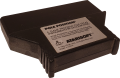
Pole Position is a port of the of the popular arcade Racing video game of the same name. It was programmed for the TI-99/4A by some of the biggest names in TI programming Jim Dramis, Paul Urbanus, and Garth Dollahite. It was published by Atarisoft as part number RX 8534 on Solid State SoftwareTM Command Module video game cartridge. It was released during the second quarter of 1984 and retailed for $44.95 (USD).
| Pole Position | |
|---|---|
.jpg) | |
| Publisher(s) | Atarisoft |
| Original Retail Price | $44.95 (USD) |
| Programmer(s) | Jim Dramis, Paul Urbanus, Garth Dollahite |
| Part# | RX 8534 |
| Format(s) | Solid State SoftwareTM Command Module |
| Release | 1984 (2nd quarter) |
| Genre(s) | Racing |
Contents
Gameplay
The player in Pole Position controls a Formula 1 race car as it hurls along the racing speedway at Fuji Racetrack. To begin, the player has to qualify during a time trial lap. The player must complete the time trial between 57 and 120 seconds to qualify. Based on the time trial completion time, the player is placed in the field of 8 racers from either the pole position or position 1, to position 8. As the player races, he/she must avoid crashes with other racers, and keep from veering offroad where billboards await to destroy wayward racers.
Advertising Blurb
Spring 1985 Triton Catalog
You're the driver of a powerful Grand Prix racing car, working your way around the treacherous road course. Watch out for those curves, road hazards and other cars If you want to make it through the e qualifying lap.
From Back of Retail Packaging
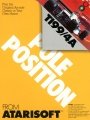
First, the qualifying run . . . you and your turbo-charged Formula 1 racer capture the pole position - the spot every driver dreams of. The other racers line up, engines roar, and you're off! Hanging tight to the curves, weaving in and out of the pack, you jockey for the lead. Then you break away, with steel determination to first in the run for the checkered flag . . .
Manual
Install Your Engine
Load the POLE POSITION cartridge into your TI 99/4A Home Computer as explained in your computer owner's guide, and tum on your computer. The master title screen should now appear. Now you can press any key to display the master selection list.
Next, press the numbered key which corresponds to Pole Position and the game title screen will appear. Press any key to display the option screen to choose one of three difficulty levels and/or the number of laps in a race (1-8).
Press ENTER to start the game. Press "P" to pause during game play and any other key; joystick, or fire button to reactivate the game after a pause.
NOTE: Make sure that the ALPHA LOCK key is in the up position when using joysticks.
The object of Pole Position is to pit yourself against the clock and the competition ( other high-performance racers). Now is your chance to prove you've got the nerve and skill t? be a professional race car driver.
And They're Off!
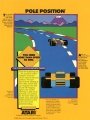
You can steer your racer by moving the joystick to the left or to the right. Increase or decrease your speed by moving the joystick up or down, respectively. Pressing the "FIRE" button allows the driver to change from low to high gear. In the extreme upper right-hand comer of the playing screen, is your current Lap Time Counter (0"00). The Time Clock at the center, which determines the remaining time your car has to cross the finish line, winds down as your Lap Time Counter increases. Also, at the top night is the high and low gear indicator (HI/LO). Your speed as shown can reach a max of 195 MPH.
When the game screen first appears, you are ready to qualify for a race. Before you can compete in any of the races, you must qualify for one of the eight starting positions. You have 90 driving seconds in the qualifying run, but must achieve a lap time of 73" (seconds) or better to qualify for a race. Once you've qualified, the race that was selected begins in a matter of seconds.
The first lap in a race has a maximum time limit of 75 seconds. More cars appear on the course in each successive lap. But you begin a new lap with additional time to complete it - only if you've finished the previous lap in the allotted time.
If you hit another car, your car will explode, costing you precious time. You'll also wipe out if you run into a road sign. No matter how many times you crash, you'll receive another car until your time runs out.
Part of the playing strategy is to try and keep your car on the road - you lose time (and thus points) when the car is off the track. Skidding also causes your car to slow down. Gun it on the straightaways. If you find yourself going too fast, downshift or reduce speed to ease around the more difficult turns.
Keyboard Controls
| Left Handed | Right Handed | |
| Increase Speed | E | I |
| Decrease Speed | X | M |
| Left | S | J |
| Right | D | K |
| Gear Shift | Y or . | Q or V |
| Upper-Left | W | U |
| Upper-Right | R | O |
| Lower-Left | Z | N |
| Lower-Right | C | , |
Strategy Tips
□ . . . Always shift from low gear to high gear around 100 MPH for the best acceleration. □ . . . Try to stay on the center striped line most of the time. You can squeeze between two computer cars in this position. □ . . . The beginner should play the game with his car at the lower speeds, not 195 MPH! □ . . . For a double braking effect when needed, slow down by reducing your speed and simultaneously shifting to low gear. □ . . . If the other cars immediately ahead of you are packed tightly together, wait for them to separate before attempting to pass. □ . . . If no billboard signs are obstructing your path, you might be able to pass other cars by driving on the grass. □ . . . Try to take the curves with a series of small turns rather than one large turn, as this will reduce skidding which slows your car.
NOTE: Compatible with all TI 99/4A computers except units with a Version 2.2 Operating System.
Scoring
Playing Pole Position, you score points in several ways, as shown below:
Every lap completed is worth 10,000 points.
 |
Each car you pass
is worth 50 points. |
 |
After you cross the finish line,
each second of time left on the Time Clock is worth 200 points. |
The chart below lists the qualifying lap times for the eight starting positions in the race, and the number of bonus points awarded for each qualifying time:
| Starting Position | Lap Time | Bonus Points |
| 1 | 58"50 | 4000 |
| 2 | 60"00 | 2000 |
| 3 | 62"00 | 1400 |
| 4 | 64"00 | 1000 |
| 5 | 66"00 | 800 |
| 6 | 68"00 | 600 |
| 7 | 70"00 | 400 |
| 8 | 73"00 | 200 |
Downloads
Pole Position Cartridge
Pole Position Manual Front Cover
Pole Position Box (front)
Pole Position Box (back)
Pole Position Manual Complete (pdf format)
Pole Position MAME/MESS Rom (rpk format)
Atarisoft Warranty Card (pdf format)

Atarisoft Questionnaire Card


.jpg)
References
External Links
- Atari Computer Museum: Pole Position
- Game Database: Pole Position (TI 99/4A)
- GameFAQs: TI-99/4A - Pole Position
- Moby Games: TI-99/4A - Pole Position (TI-99/4A)
- Pixelated Aracade: Pole Position
- PixelPendant's Texas Instruments Manual Compendium: Pole Position
- TI-99ers On-line User Group: TI-99 Cartridge Listing
- TI-99/4A Video Gamehouse: Pole Position
- Wikipedia: Pole Position
